Made for solo freelance video editors

Less chasing. More editing.

No more feedback scattered across WhatsApp, email and Drive. Proposals, contracts, timecoded client review and invoices in one place — your clients get a single link, not another login.

How many projects are on your plate right now?

  • First 2 projects on Pro, free
  • No card needed
  • No charge unless you upgrade
editorflow.app/dashboard
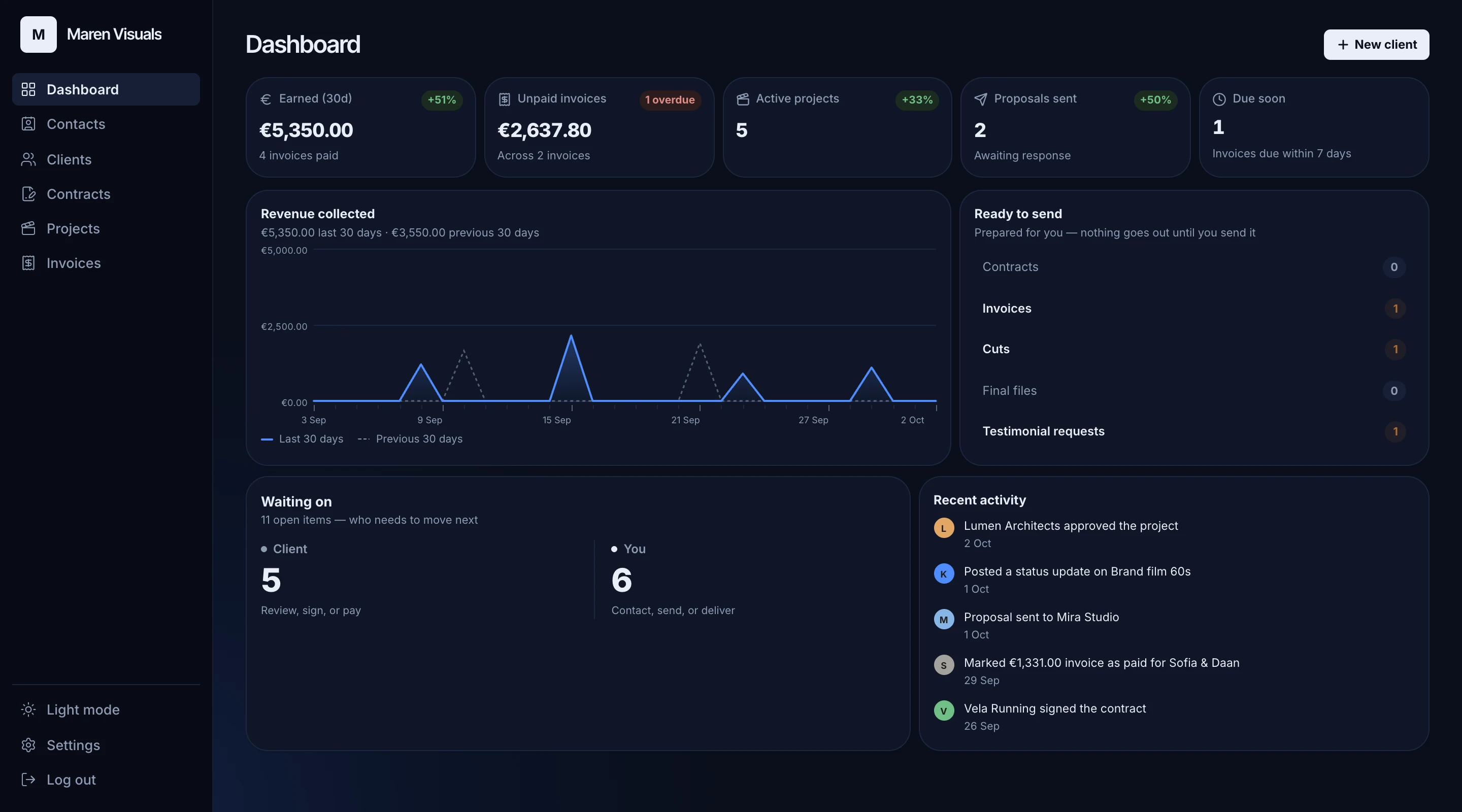
EditorFlow dashboard: money earned and unpaid, active projects, what's ready to send, and which projects are waiting on the client or on you

1 link

is all a client needs — no account, no password

0%

of your payments passes through us

2 projects

on Pro, free — no card

€15

a month for Pro after that — excl. VAT

Right now, your business runs on tabs

A Drive link buried in a chat. A proposal template you hope you updated. Invoices in a spreadsheet only you understand.

“Did you get my last message?” — again
Feedback like “the bit near the end” in a WhatsApp voice note
Chasing an unpaid invoice from memory

Client review · try it right here

Feedback on the frame, not in a voice note

Your client pauses where something's off, types a note or circles it on the picture — and it lands on your timeline at that exact moment, on the cut it was made on. No more “the bit near the end”. Go on, leave one below.

  • Comments pinned to the exact moment, with replies you resolve as you go
  • Clients draw on the frame instead of describing it
  • New cuts stay private until you press Send for review
  • Approval is recorded — who, when, and which version
0:00.0 / 0:00.0
Point at it:

Space plays and pauses · ← → move a second · , and . nudge a hair · click the timeline to jump

Comments

2 open

Click a comment to jump to that moment

  • Example clientTiming

    Can we hold on this peak a beat longer before the cut?

  • Example clientPicture

    Love the light here — maybe a touch warmer in the grade?

This is the page your clients get. A demo: nothing is saved, and it resets when you reload. Footage by Major & Wang on Pexels.

Hosted playback is part of Pro. On Free, clients review through your own Drive, Vimeo or YouTube link — commenting and approving work on every plan.

Start free trial
  • First 2 projects on Pro, free
  • No card needed
  • No charge unless you upgrade

Client portal

Your client gets a link, not a login

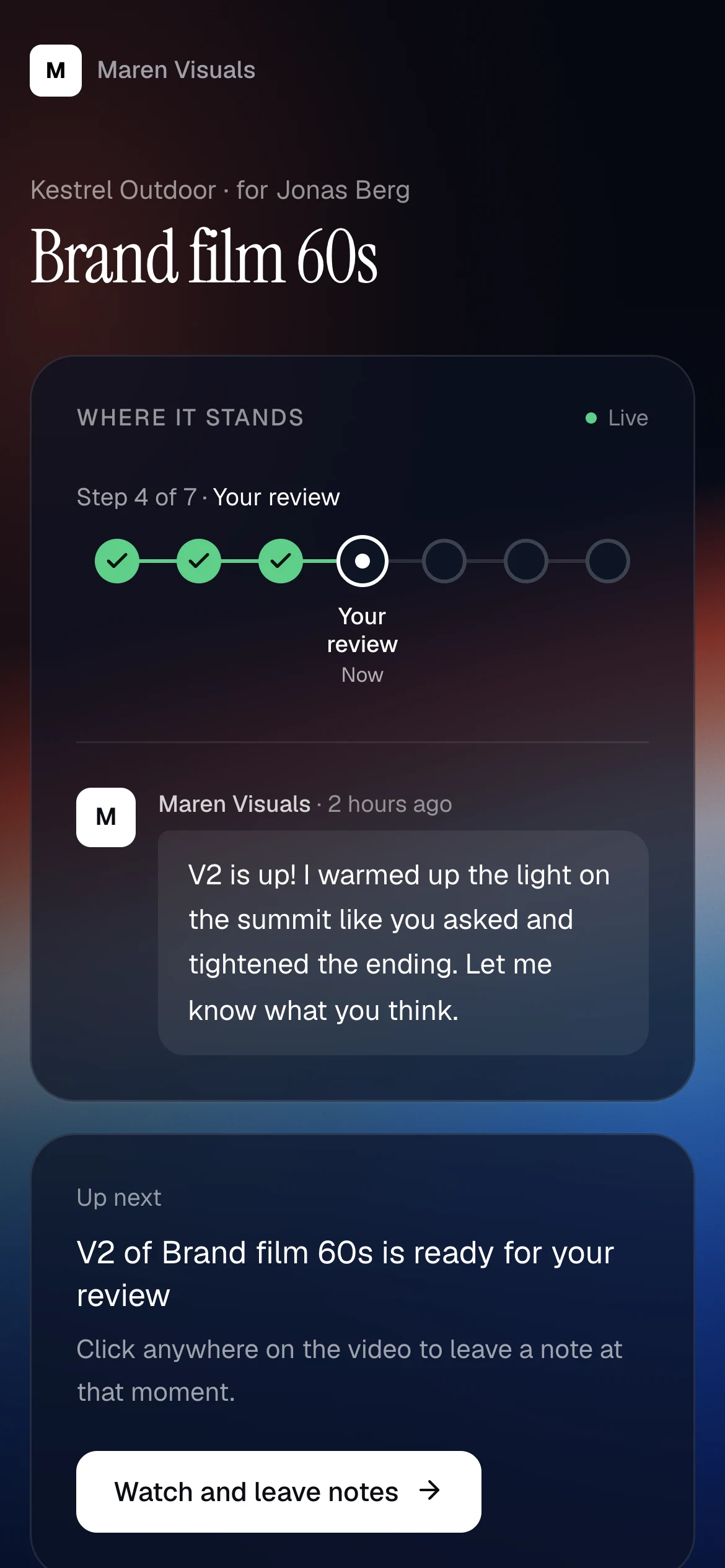
Proposal, contract, the cuts to review, invoices and the final file — behind one private link that opens on any phone. Your client always sees where their project stands, and the one thing you need from them next.

  • A live status of the project, with a short note from you
  • One clear next step: sign, pay, review or download
  • Each client only ever sees their own work — and confirms it's them with a code by email
  • Your own logo and brand color on every page (Pro)
Open the demo portal(opens in a new tab)
The client portal on a phone: the project's live status with a note from the editor, and the next step — a new cut ready to review

Paperwork

The admin writes itself. Sending stays yours.

Accept a proposal and the contract is ready. Once it's signed, invoices follow the payment terms you set — deposit and final, or all at once. Everything waits as a draft until you click send.

  • Deposit and final, full upfront, or full after delivery
  • Sequential invoice numbers, VAT and your KvK on every plan
  • Your own payment link — the money goes straight to you
  • Automatic reminders at 3, 14 and 30 days overdue (Pro)
See an example invoice(opens in a new tab)

Maren Visuals

Voorbeeldstraat 1

1234 AB Utrecht

Netherlands

KvK 12345678

Invoice

2026-021

Date 23 Oct 2026

Due 6 Nov 2026

Bill to

Kestrel Outdoor

Jonas Berg

Voorbeeldlaan 8

1234 CD Amsterdam

Netherlands

DescriptionAmount
Final payment, Brand film 60s€900.00
Subtotal€900.00
VAT 21%€189.00
Total€1,089.00

Pay online

buy.stripe.com/example

Paid directly to Maren Visuals

Invoice 2026-021, page 1 of 1

Automatic reminders

On for this invoice · Pro

  1. Due 6 Nov
  2. 3 days late, 9 Nov
  3. 14 days late, 20 Nov
  4. 30 days late, 6 Dec

Stops the moment you mark it paid

Insights

See where your money and your time go

Per quarter, per year or over the last twelve months: what you invoiced and what came in, which clients it came from, how fast they pay and how many revision rounds you gave away. It's all worked out from the work you already do here — there's nothing extra to keep track of.

  • Income per month and per client, compared with the same time last year
  • How fast each client pays, and what's still to come in
  • From proposal to paid: where work drops off
  • Revision rounds, review speed and how busy you were, week by week

What you invoiced is on every plan. The full picture is part of Pro.

Insights

Example figures
QuarterYear12 months
Invoiced
€40,500+19%
Received
€35,050
Paid after
16 days

Invoiced per month

PaidOpenLate
NovDecJanFebMarAprMayJunJulAugSepOct

Per client

  • Kestrel Outdoor€15,200 · 38%
  • Lumen Architects€7,650 · 19%
  • Festival Oost€7,400 · 18%
  • Vogel Film€7,250 · 18%

Still to come

€5,450

  • Late€3,800
  • Sent, not yet due€1,650

Deliver the master, untouched

Your client downloads the final export from their portal — byte for byte, no WeTransfer link that expires in a week. You see when it's been picked up. (Pro)

Revision rounds, counted

Every round is numbered against what you set for the project, so “one more tweak” is visible before it turns into free work.

Nothing sent behind your back

Contracts, invoices, cuts and final files wait for your click. An email you didn't mean to send can't be unsent — so we never send one for you.

Start free trial
  • First 2 projects on Pro, free
  • No card needed
  • No charge unless you upgrade

One pipeline, start to finish

Every client moves through the same stages — and the paperwork follows along on its own.

  1. 01

    Contact

    Log the inquiry, or let them use your intake form.

  2. 02

    Proposal

    Scope, price and payment terms, accepted in their portal.

  3. 03

    Contract

    Generated from the proposal and signed online.

  4. 04

    Review

    Share cuts, collect feedback, get the approval.

  5. 05

    Invoice & deliver

    Invoices follow your terms; the final file waits in the portal.

Editing for agencies? Skip straight to the work.

When the agency handles the proposal, the contract and the invoice to its client, you don't need any of it here. Start a project in one step, share your cuts, let the agency review on the frame and approve, and deliver the master from the portal. Billing the agency for your work is one invoice, whenever you want it.

Shaped by working editors

EditorFlow is built together with freelance video editors who test it and tell us what's in the way. Some of what changed because of them:

Nothing reaches a client without your click

Editors wanted eyes on every contract and invoice before it goes out. So everything waits as a draft until you press send.

A live status your client can check

Fewer “how's it going?” messages. The portal shows where the project stands, with a short note from you.

A calmer app to work in

An editor found it busy to look at. The titles got quieter and the Save buttons disappeared — your edits save themselves.

Skip the contract when you don't need one

Not every job needs a signature. For a regular client, go straight from yes to invoice.

By editors, for editors

Hey, I'm Luc — a video editor from Utrecht. Like most freelancers, I'd rather be editing than chasing feedback in WhatsApp or keeping invoices in a spreadsheet. So I started building the tool I wished I had. Other editors test it with me, and a lot of what's in here exists because they asked for it.

Luc · Video editor, Utrecht · @lucvde_ on Instagram

Three promises we keep on purpose

Your money goes straight to you

Paste your own Stripe or PayPal link on each invoice. We never process, hold or take a cut of a payment.

Your footage stays yours

We only host the review copy and the final file you choose to upload. Raw footage and project files stay wherever they live now.

Made for solo editors — nobody else

Not for studios, not for teams. No seats, no roles, no team dashboard you'll never open — one editor, whether your clients are brands or the agencies that hire you.

Simple pricing for one editor

Try Pro on your first 2 projects — free, no card. Your trial runs until you start a project after those 2, or 30 days at most.

Free

After your trial — no time limit, no card

€0/mo

Excl. VAT

  • Up to 3 active projects
  • Unlimited clients, proposals, contracts and invoices
  • Client portal with private links
  • Review through your Drive, Vimeo or YouTube link
  • Legal invoicing: VAT and sequential numbers
Start with 2 Pro projects

Pro

2 projects free

For a full freelance calendar

€15/mo

Excl. VAT

  • Unlimited active projects
  • Hosted review with timestamped comments and drawing
  • Comments as markers in Resolve, Premiere and Final Cut
  • Insights: income per client, payment speed, revisions and how busy you are
  • Final file delivery through the portal
  • Your logo and brand color on the portal
  • Automatic payment reminders
  • Everything in Free
Try Pro free on 2 projects
Or subscribe now: €144/year€15/monthSecure checkout by Stripe. Cancel any time.

€144/yr (€12/mo) when billed annually. Cancel whenever — going back to Free archives projects over the limit, it never deletes them.

Questions, answered

I edit for agencies. Is EditorFlow for me?

Yes. When the agency handles the proposal, the contract and the invoice to its client, you skip all of that: start a project in one step with the agency as your client, share your cuts, let them review on the frame and approve, and deliver the master from the portal. No invoice is made for you — when you want to bill the agency for your work, you write one yourself. And when a direct client comes along, the proposal-to-invoice flow is there too.

How does the free trial work, and what happens after?

You get every Pro feature, and your first 2 projects run on Pro: upload your cuts and final files (60 minutes of review video, 10 GB for final files) and your client reviews in the player. The trial ends when you start a project after those 2, or after 30 days — whichever comes first. Then you move to the Free plan automatically: no card on file, so no surprise charge. Your trial projects keep uploads and the player until 30 days after you signed up — a client in the middle of a review isn't cut off — and never count toward the Free plan's 3 active projects. Videos you uploaded for review are kept 14 more days after that, then cleared — we email you before that happens. Final files your clients download stay.

Do you store my video files?

Only what you choose to upload on Pro: a review copy, which plays through short-lived private links, and the final file you deliver. Raw footage and project files never live here. Pro includes 200 minutes of review video and 100 GB for final files; a closed project's review copy is cleared after a week, with an email before it happens. Prefer your own Drive, Vimeo or YouTube? Paste the link instead.

Will EditorFlow email my clients on its own?

No. Contracts, invoices, new cuts and final files wait as drafts until you press send. The automation prepares the work; you decide when it goes out.

Do you hold or process my clients' payments?

No. You paste your own Stripe Payment Link, PayPal link or similar onto each invoice. Money goes straight to you — marking an invoice paid is always something you do yourself.

Do my clients need to create an account?

No. Each client gets a private link that opens their proposal, contract, project and invoices — no signup, no password. The first time they open it on a device, we email them a login code, so a forwarded link alone doesn't get anyone in.

Can two of my clients see each other's information?

No. Every portal link is scoped to one client, and that's enforced by the database itself — not just hidden in the interface.

Is the contract signature legally binding?

It's a lightweight signature — typed name, timestamp and IP address. Good for freelance client work, not a certified e-signature for high-stakes legal documents.

Can I use this with a team?

Not yet. EditorFlow is built specifically for solo freelance editors, and team features aren't on the roadmap right now.

Give your next client the smooth version

Set up your first client in a few minutes. Your first 2 projects on Pro, no credit card.

Start free trial
  • First 2 projects on Pro, free
  • No card needed
  • No charge unless you upgrade